


Luma Dream Machine
3.331.00 Reviews
App Specs
- Version
- 12
- Updated On
- License
- Free
- Downloads
- 10,000+
- Developer
- Infinity AI Solutions
- Categories
- Personalization
- Platform
- Android
Screenshots
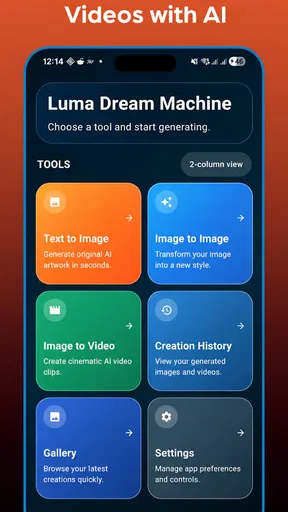



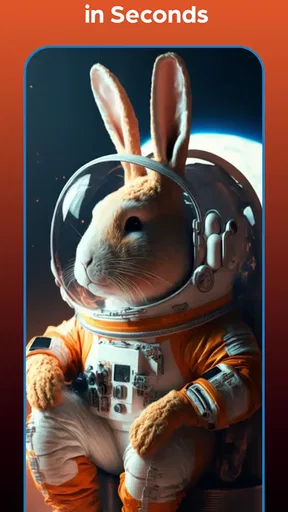
 Analysis by AppCompare
I approached Luma Dream Machine as a creative personalization app rather than as a simple image generator. Its main appeal is the attempt to bring text-to-image, image-to-image, and AI video creation into one mobile workspace. That combination can be useful when I want to move from a rough idea to a visual concept without switching between several tools, although the experience is not equally valuable for every type of user.
The app is developed by Infinity AI Solutions and is available as a free download for an Everyone audience. It belongs to the personalization category, but its practical use reaches beyond changing a phone’s appearance. I see it more as a pocket studio for experimenting with visual ideas, creating reference material, and turning a still concept into something with motion. The free entry point makes it easy to test, while the paid structure means I would want to understand my own usage before spending money.
How the free and paid experience affects its value
The most important cost detail is straightforward: the app is free to download, with in-app purchases ranging from $5.99 to $59.99 per item. That gives newcomers a low-risk way to see whether the workflow suits them, but it also means the word “free” should not be confused with unlimited creative use. The available purchase range is wide, so the value depends heavily on how often I generate content and what the individual purchase provides at the moment I use it.
I appreciate this arrangement for casual experimentation. Someone who only wants to try a few prompts, explore visual directions, or see how an existing picture can be transformed can begin without paying upfront. For a person who expects to create regularly, however, I would treat the free access as an evaluation period rather than assume it will cover a complete production workflow. Before buying, I would check the current in-app purchase details carefully and compare them with the amount of content I realistically expect to make.
The app currently carries a 3.3 average from around ninety ratings, alongside around thirty reviews. That is not a reason to dismiss it, but it does suggest a mixed public experience rather than universal satisfaction. I would read that rating as a prompt to test the app personally, especially because AI creation tools can feel very different depending on whether the user cares most about speed, consistency, video results, or simple visual play.
Its audience size is still modest, with over ten thousand installs, so I would not approach it as a mature, universally established replacement for every specialized creative tool. That can be a disadvantage if I want a deeply proven ecosystem, but it can also make the app interesting for people who prefer trying a less crowded tool. The current version is twelve, and it requires Android seven or later, which keeps it accessible to many older Android devices while still making device compatibility worth checking before installation.
What the three creative modes are good for
Text-to-image is the natural starting point when I have an idea but no source material. I can think in terms of subject, setting, mood, lighting, color, and composition instead of searching through stock images. The useful trick is to describe the relationship between elements, not merely list objects. “A red bicycle beside a rainy café window” gives the system a scene to interpret; adding the intended atmosphere and viewpoint gives me more control over the result.
Worth Reading Before You Choose

EA SPORTS FC Mobile 26 Is a Bigger Football Game, but It Takes Time

Flipboard Shows What News Apps Must Do Beyond the Feed

Switching to Android Auto Means Rethinking Your Driving Routine

Google Calendar Makes a Crowded Week Easier to Manage

Ludo King Makes the Most of the Minutes Between Plans

Baby Panda World Brings Quick Play to Modern Phones, but Its Game Library Feels Busy
Image-to-image is more practical when I already have a sketch, photograph, or visual reference. Rather than asking the app to invent everything, I can use an existing image as an anchor and request a change in style or setting. This is particularly helpful for testing alternatives: a room can be imagined with a different mood, a rough character drawing can become a more polished concept, or a personal photo can inspire a new visual direction.
The video generator is where the app becomes more ambitious. A still image can serve as the starting point for a moving interpretation, which is useful for short concept clips, social posts, mood boards, and visual storytelling. I would not treat this as a full video editor, though. Generating motion from an image is different from controlling a timeline, arranging multiple shots, editing sound, or making precise frame-by-frame corrections.
The strongest idea here is continuity between modes. I can begin with words, refine the visual direction through an image, and then explore motion from that result. Even if the final output needs work elsewhere, this sequence reduces the friction of moving an idea from imagination to something concrete. That is more useful than having three unrelated buttons that each produce a different kind of result.
A workflow I found more useful than random prompting
My preferred approach would be to separate exploration from refinement. First, I would use a short prompt to discover a broad direction. Once I found an image with the right subject and composition, I would stop changing everything at once. I would modify one aspect at a time, such as the lighting, material, background, or camera viewpoint. This makes it easier to understand which instruction actually improved the result.
For image-to-image work, I would keep the original reference available and make small variations rather than repeatedly pushing one output through increasingly different transformations. A dramatic change can be exciting, but repeated transformations may gradually move the result away from the details that made the original useful. Saving the best intermediate image is therefore a practical habit, especially when I am exploring a design rather than chasing a single surprise.
For video, I would choose an image with a clear focal subject and uncomplicated composition. A crowded scene gives the generator more relationships to interpret, while a strong central subject makes the intended motion easier to imagine. I would also write prompts around movement and atmosphere instead of simply repeating the image description. The difference between “a person in a forest” and “a person standing still while leaves move in a soft breeze” is the difference between describing a picture and suggesting an event.
That workflow is one of the app’s less obvious strengths: it encourages me to use generated images as planning material, not just final artwork. A designer could use them to compare directions before committing to a polished project. A writer could create visual references for a scene. Someone preparing a presentation could explore a visual metaphor before searching for conventional illustrations.
Everyday uses beyond making attractive pictures
A realistic example would be planning a small room refresh. I could photograph the room, use image-to-image generation to explore warmer colors or a different decorative mood, and then create a short moving concept to imagine how the space might feel as the camera passes through it. The result would not replace measurements, product research, or a proper design plan, but it could help me decide which direction is worth pursuing before spending money.
Another useful case is preparing a social post when I know the message but do not have a suitable visual. I could generate a few backgrounds, choose one with enough empty space for text, and use the result as a starting point in a separate editing app. The key is to treat the generated image as a flexible asset rather than expect it to contain perfectly arranged typography. For text-heavy graphics, a conventional design tool remains the safer choice.
I can also see value for students, writers, and tabletop storytellers who need quick visual references. A character concept, environment, or mood image can make an abstract idea easier to discuss. In that role, the app is valuable even when the output is not publication-ready, because the image helps people react to a direction. That is a different standard from professional illustration, and it is where the free entry point may make the most sense.
For personal customization, the app can help create wallpapers or themed backgrounds that feel more specific than a generic download. I would design around the phone’s layout by leaving calmer areas where icons will sit. This is a small but important detail: an attractive image can become frustrating if its brightest subject sits directly beneath app icons or if a busy pattern makes the screen difficult to read.
Where the app feels less suitable
The biggest trade-off is control. A prompt-based system can produce an appealing interpretation, but it does not give me the same precise command as a conventional editor with layers, masks, selections, and repeatable adjustments. If I need an exact logo placement, a particular product shape, consistent characters across many scenes, or dependable typography, I would choose a specialist tool or use this app only for the early concept stage.
Consistency is especially important in video. Turning a still image into motion is attractive for a quick clip, but a longer story usually needs stable identity, deliberate shot planning, and predictable transitions. If the purpose is a polished advertisement, tutorial, or narrative sequence, I would want an editor that gives me direct control over every shot. Luma Dream Machine can contribute ideas or source material, but I would not make it my only production tool for that kind of work.
There is also a practical cost trade-off. Free access is helpful for testing, but frequent generation can make paid purchases more relevant. Since the purchase options span from $5.99 to $59.99 per item, I would avoid buying impulsively after one impressive result. I would first decide whether I need occasional inspiration or a repeatable workflow, then assess whether the purchase size matches that purpose. A person who creates only once in a while may find the free option sufficient, while a heavy user should compare the total cost with dedicated alternatives.
The rating of 3.3 also makes me cautious about recommending it blindly. A mixed score can reflect different expectations: some people may want instant finished artwork, while others are happy with rough creative exploration. My advice would be to test the exact type of output you need. Do not judge the app only by a beautiful example generated from a simple prompt; try a difficult subject, a specific composition, and a short video idea that resembles your real project.
Privacy and originality also deserve sensible judgment, even without turning them into reasons for panic. I would avoid uploading sensitive personal photographs, confidential work, or images containing information I would not want processed by an online creative service. For commercial work, I would separately review the current terms that apply to generated material and any source images. The app may be useful for brainstorming, but professional ownership and confidentiality questions should be handled with care before publication.
How it compares with familiar alternatives
Compared with a standard wallpaper app, this tool offers far more personal input. Instead of browsing finished collections, I can describe a scene or transform an image I already have. The disadvantage is that browsing is faster when I simply want a dependable background immediately. If my priority is convenience and predictable quality, a curated wallpaper service may be better.
Compared with a dedicated image editor, the app is quicker for generating possibilities but weaker for exact corrections. An editor wins when I need to remove a particular object, align elements, preserve brand colors, or prepare a precise final file. Luma Dream Machine wins earlier in the process, when I am asking, “What could this look like?” rather than, “How do I make these pixels exact?”
Compared with a dedicated video editor, its advantage is the speed of creating a moving concept from a visual idea. A traditional editor remains better for trimming, sequencing, sound, captions, transitions, and repeatable control. I would use the two together if my goal were a short creative project: generate or explore the visual direction here, then assemble and finish the material elsewhere.
Compared with separate AI image and video apps, the unified approach is convenient because I do not have to rebuild the concept from scratch in another interface. That convenience has a cost, though: a combined app may not go as deep in each specialty as a tool designed for only images or only video. Users who already have a favorite image generator and a reliable video editor may gain little from switching unless the shared workflow is especially important.
Who is most likely to enjoy it
I would recommend trying it to people who like visual experimentation, need quick concept references, or want to explore motion without learning a complex editing suite first. It is also a reasonable option for someone who wants to create personalized backgrounds and visual ideas from a phone. The free download makes the decision easier because I can test the workflow before considering any purchase.
It is less suitable for users who need guaranteed consistency, professional layout control, or a complete video-production environment. I would also tell budget-conscious users to stay with free experimentation until they understand their actual usage. The presence of purchases does not automatically make the app poor value, but it does make planning important. Paying for creative generation only makes sense when it saves me time or helps me produce something I could not easily create another way.
Beginners should not feel pressured to write elaborate prompts. I would start with the subject, setting, visual style, lighting, and viewpoint, then refine based on what the output gets wrong. Advanced users may appreciate the three-part workflow more than the first result itself: text can establish the idea, image transformation can preserve a direction, and video can test whether that direction works in motion.
My verdict on downloading or skipping
My overall view is cautiously positive. Luma Dream Machine is worth trying when I want one mobile app for visual ideation across still images and AI-generated video. Its best value is not as a replacement for every creative tool, but as a fast bridge between a vague thought and a visual reference I can react to, revise, or carry into another workflow.
I would download it if I were curious about AI-assisted personalization, needed mood boards or concept art, or wanted to experiment with turning images into short moving scenes. I would skip it if I required exact design control, dependable long-form video production, or a clearly predictable cost for frequent generation. In those cases, a dedicated editor or a more specialized service may be a better fit.
The free price makes testing sensible, while the purchase range means I would keep spending disciplined and evaluate results using my own projects rather than attractive demonstrations. With an Everyone age rating and Android seven or later support, it is approachable for a broad audience, but approachability should not be mistaken for professional precision.
In the end, Infinity AI Solutions has put together an appealing creative experiment with a useful progression from text to image to motion. I would recommend it as a companion for brainstorming and personal visual projects, not as a complete studio. If you value fast exploration more than pixel-perfect control, this is the kind of app worth testing before deciding whether its paid options earn a place in your regular toolkit.
Pros
- Creates impressive cinematic videos from simple text prompts.
- Supports image-to-video generation for more controlled results.
- Produces creative camera movements and dynamic visual effects.
- Web-based workflow works across supported mobile and desktop browsers.
- Regular model improvements can enhance quality and consistency over time.
Cons
- Free generations may be limited and can run out quickly.
- Busy periods may cause slow queues or delayed video processing.
- Text prompts do not always produce accurate details or motion.
- Results can include visual glitches
- warped objects
- or inconsistent faces.
- Commercial usage and licensing terms should be checked before publishing videos.
FAQs for Luma Dream Machine
What is Luma Dream Machine, and what can I use it for?
Luma Dream Machine is an AI-powered video generation tool that creates short video clips from written prompts and, depending on the available features, reference images. After testing its workflow, I found it most useful for quickly producing concept videos, social media ideas, storyboards, product visuals, and experimental animations. It is designed for creative exploration rather than replacing a complete professional video-editing application.
Does Luma Dream Machine work on Android and iOS devices?
Luma Dream Machine is primarily accessed through Luma’s supported web experience, while mobile availability and app features may vary by region, device, and current release. Before downloading anything, users should verify that the application is published by the official developer and check its store listing. A modern device, reliable internet connection, and updated operating system are recommended for a smoother experience.
How do I create a video with Luma Dream Machine?
To generate a clip, you generally enter a detailed text description explaining the subject, setting, movement, visual style, and camera direction. The service then processes the prompt online and returns an AI-generated result. In my experience, specific prompts produce more consistent outcomes than short requests. It is also helpful to describe motion clearly, because unusual actions, hands, faces, and complex scenes may still contain visual errors.
Is Luma Dream Machine free to use?
Luma Dream Machine may offer limited free access, but generation credits, queue priority, resolution, watermarking, commercial rights, and other capabilities can depend on the current subscription plan. Availability and pricing may change, so users should review the official pricing page before generating many videos. Free access is useful for testing the technology, while frequent creators may need a paid plan for regular production.
Are the videos created with Luma Dream Machine suitable for commercial use?
Commercial usage depends on the plan, licensing terms, and the specific content used in the generation. Users should read Luma’s current terms before publishing AI-generated clips in advertisements, client projects, monetized channels, or products. You should also avoid prompts that imitate protected characters, real people, brands, or copyrighted styles without permission, and carefully review every result for inaccuracies or potentially infringing material.


